


When disabling JavaScript is not a good idea (and how to help users understand why)
In recent months, a growing number of online reels and videos have encouraged people to disable JavaScript or install extensions such as NoScript, claiming that this allows them to "browse safely", avoid tracking or protect themselves from cyberattacks.
The intention may seem reasonable, but in most cases it stems from an oversimplification of real issues: security, privacy and technological awareness.
Why some people disable JavaScript
This trend has not come about by chance. Over the years, JavaScript has been involved in certain well-known types of attack, leading many people to believe that disabling it would provide a definitive solution.
The most frequently cited examples are:
- XSS (Cross-Site Scripting): a vulnerability that allows an attacker to inject malicious code into a web page, which is then executed by the victim's browser, often by adding a public comment to an article
- Clickjacking and advanced phishing: techniques that exploit dynamic elements to deceive users into clicking hidden buttons or links
- Tracking and fingerprinting: scripts that collect information about the device and browsing habits
- Excessive advertising or intrusive pop-ups: often created using unoptimised or third-party scripts
This leads to the seemingly logical idea that "if I disable JavaScript, I solve everything". But, as often happens, the most drastic solution is not the most effective.
What really happens when JavaScript is disabled
JavaScript is not a problem in itself: it is a language that brings interactivity to the web we use today.
Blocking it means:
- making contact and booking forms stop working
- losing search functions and dynamic filters
- being unable to view maps, galleries and product visualisations
- compromising client-side security validation
- even disrupting the interface of many websites, which appear without JS as blank pages.
In a few words, disabling JavaScript blocks everything that makes a website usable.
It is not a gain in security, but a loss of usability.
The right balance: awareness and transparency
An up-to-date browser, a reliable security extension and good browsing practices are already sufficient measures to prevent JavaScript-related risks.
For those who still choose to browse with JS disabled, it is important for the website to communicate clearly what is happening.
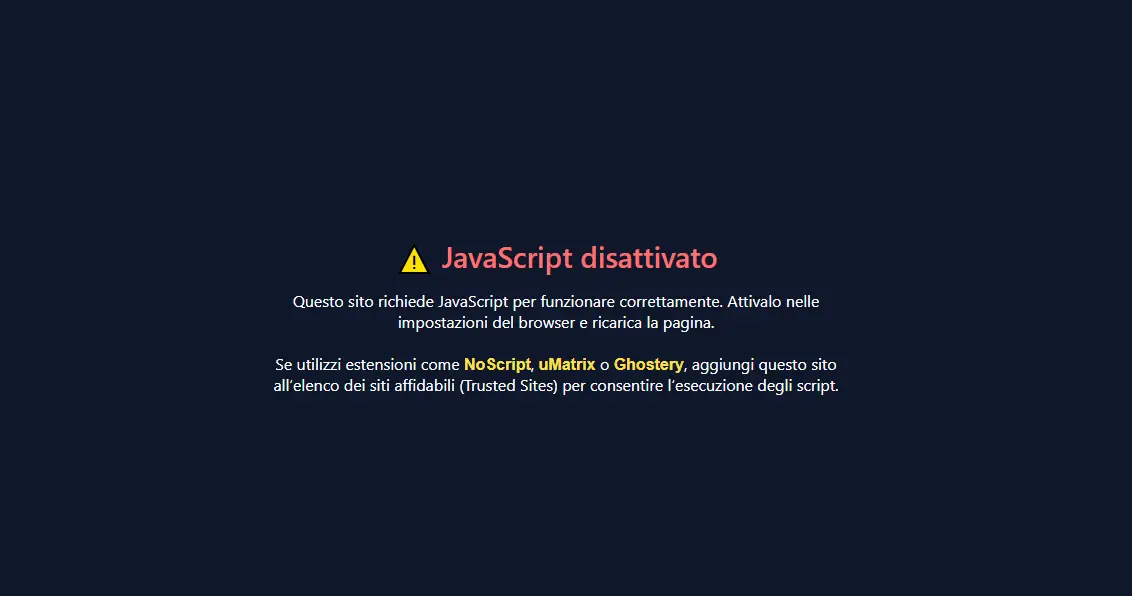
This is where our solution comes in: a visual message that appears only when JavaScript is disabled and informs users how to make the website usable again.
A technical solution that also communicates
The solution we have developed, optimised for WordPress but applicable to the vast majority of CMS platforms and PHP websites, can be customised and can detect the browser language to display a localised message without using JavaScript.
It can include the company logo, matching colours and a link to a static version of the website for those who cannot, or do not want to, re-enable JavaScript.
This way, users encounter a clear, informative message consistent with the company's identity, rather than a blank page.
SEO and fair treatment of search engines
The solution complies with Google's guidelines and poses no risk of penalties as long as a few simple rules are followed:
- the message placed inside <noscript> must be purely informative
- promotional elements or links to social media cannot be included, to avoid any possible interpretation as cloaking.
- a link to a static version of the website may be included to serve users accessing the site with JS disabled
Find out more
If you would like to explore this further or consider a customised version for your website, we are available to show you how it works in practice.
In the meantime, we invite you to learn how NoScript works by visiting the tool's official website, so you can use it with a clear understanding of its effects.
Tell us about your project
We analyse your processes to identify software and integrations that support your business.
Explore more

The new website is live!
We’ve redesigned it with one simple goal: to tell you everything about what we’ve created to help you find the right solution for digitizing your…
Read the article
Internet Day: digital beyond online presence
From the first ARPANET message on 29 October 1969 to today’s digital solutions: what it really means to make the most of the Internet at work.
Read the article